RookeryOS — Dual-Container Pod Architecture
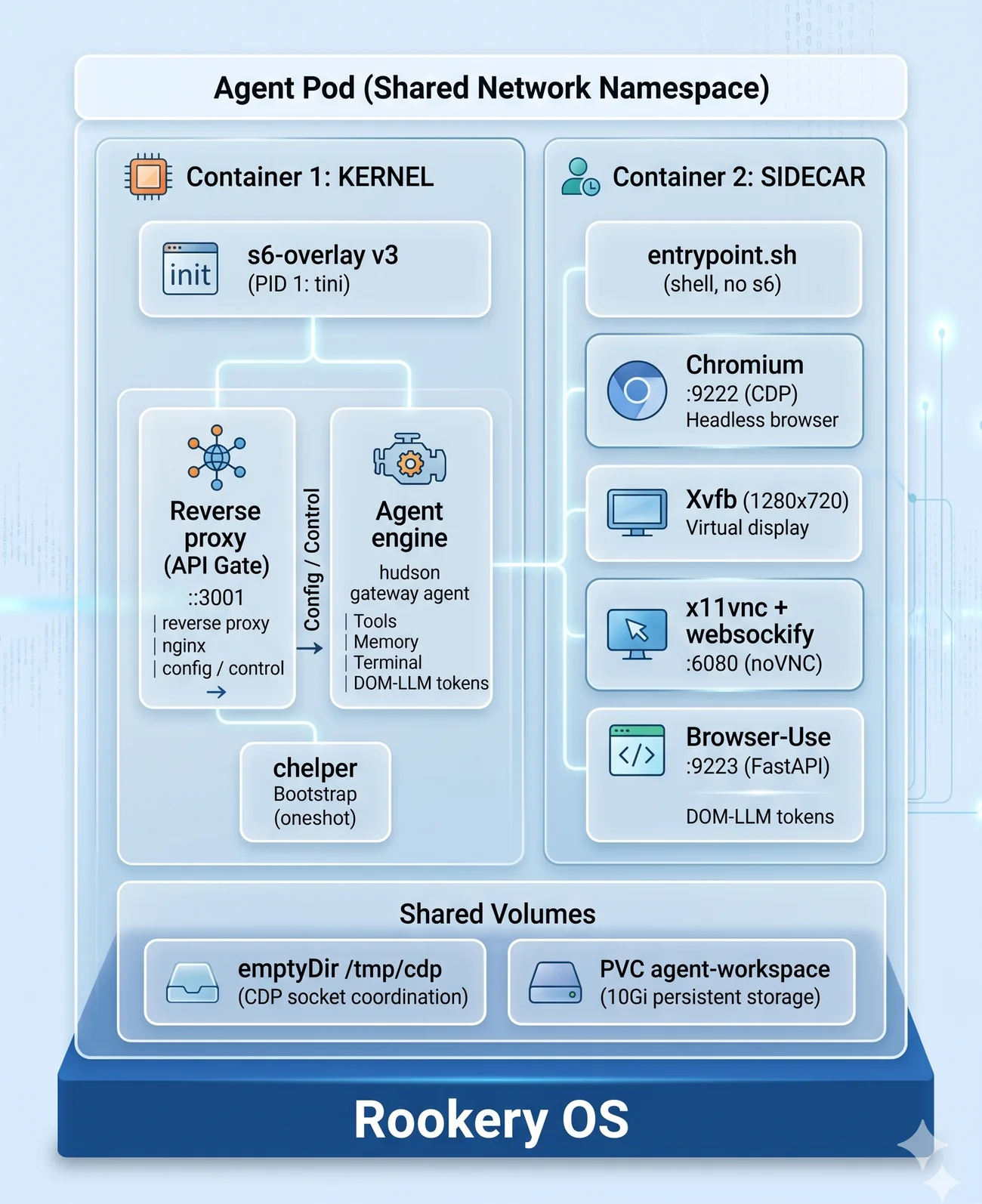
Two containers. One operating system. The LLM is the kernel.
Architecture Diagram
Container 1: Kernel
The Kernel is the brain of the pod. It runs Hudson Gateway — the agent execution engine that orchestrates LLM calls, tool invocations, memory management, and terminal sandbox operations.
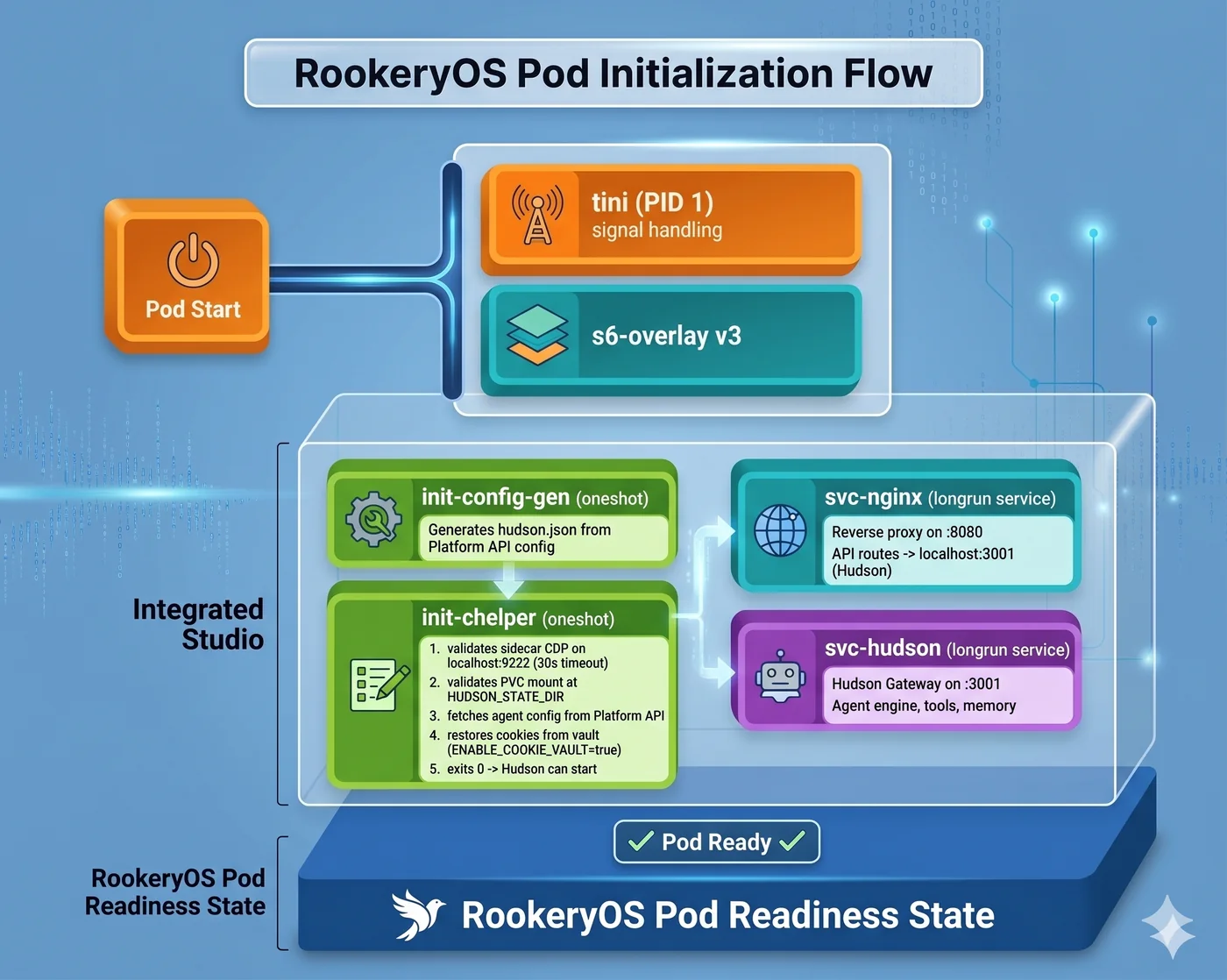
Boot Sequence
Kernel Components
| Component | File | Purpose |
|---|---|---|
| chelper | apps/hudson-gateway/src/bootstrap/chelper.ts | Bootstrap validator |
| Hudson Gateway | apps/hudson-gateway/ | Agent execution engine |
| Sidecar Browser Provider | apps/hudson-gateway/src/browser/sidecar-browser-provider.ts | CDP connection to sidecar |
| Browser-Use Bridge | apps/hudson-gateway/src/browser/browser-use-bridge.ts | DOM distillation bridge |
| Login Detector | apps/hudson-gateway/src/tools/login-detector.ts | Auth page heuristics |
| HITL Controller | apps/hudson-gateway/src/tools/hitl-controller.ts | Human-in-the-Loop flow |
| Cookie Injector | apps/hudson-gateway/src/tools/cookie-injector.ts | Cookie restoration |
| Output Formatter | apps/hudson-gateway/src/tools/output-formatter.ts | Lighthouse format output |
| nginx | s6-overlay config | Reverse proxy, static assets |
Kernel Docker Image
Base: rookery-os-base (hardened Debian bookworm-slim)
  → node:22-bookworm-slim (Node.js runtime)
    → Hudson Gateway compiled JS
      → s6-overlay service definitions
Location: infrastructure/docker/rookery-kernel/Dockerfile
Container 2: Sidecar (Eye/Hand)
The Sidecar provides the browser interface. It runs a headless Chromium browser that the kernel controls via CDP, plus a VNC stack so humans can see and interact with the browser when needed.
Service Stack
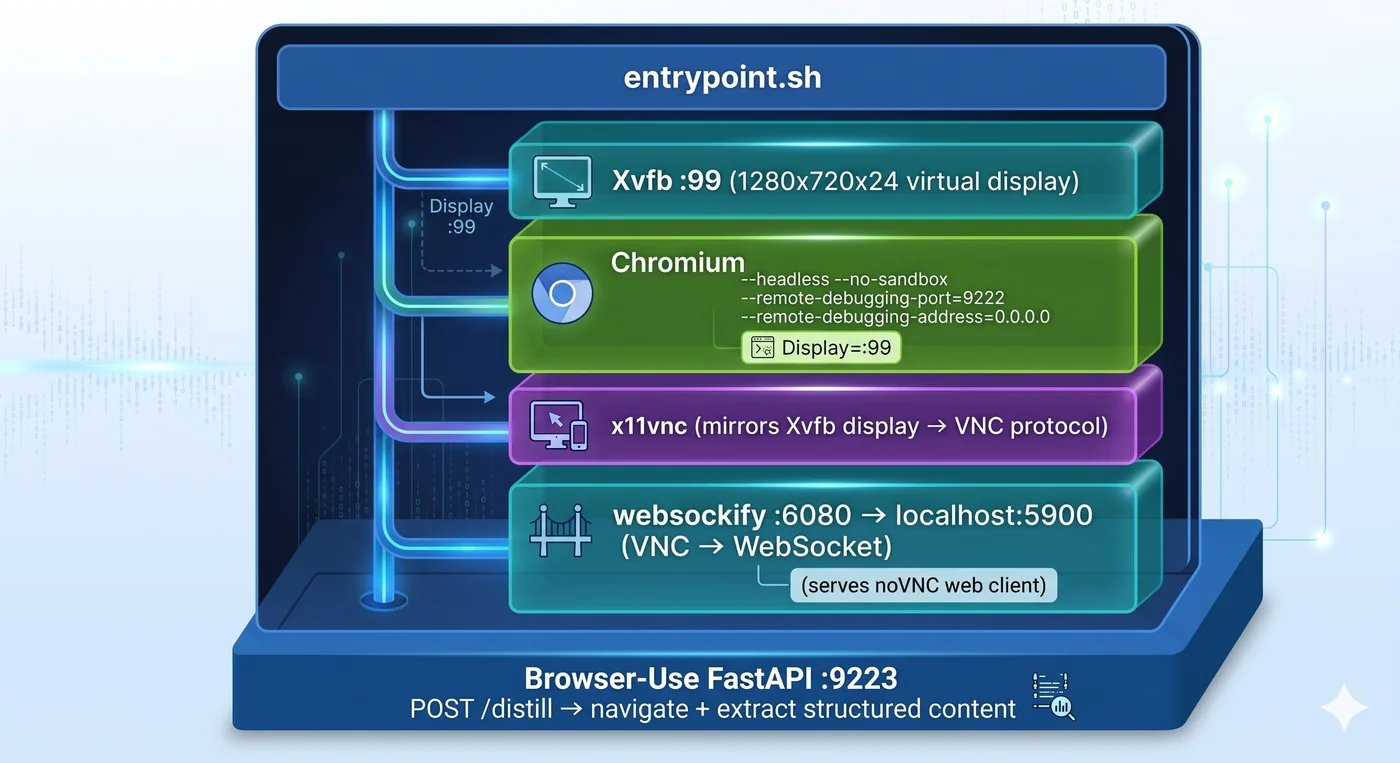
Sidecar Components
| Component | Port | Purpose |
|---|---|---|
| Chromium | 9222 (CDP) | Headless browser, controlled by Kernel via CDP |
| noVNC | 6080 (HTTP/WS) | Browser-based VNC client for human viewing |
| Browser-Use | 9223 (HTTP) | Python FastAPI for DOM distillation |
Browser-Use DOM Distillation
The Browser-Use service converts raw web pages into LLM-readable tokens:
# POST /distill
{
  "url": "https://salesforce.com/dashboard",
  "action": "extract"  # or "click", "type", "screenshot"
}

# Response
{
  "title": "Salesforce Dashboard",
  "text": "Cleaned page content...",
  "links": [{"text": "Contacts", "href": "/contacts"}],
  "forms": [...],
  "is_login_page": false
}
Purpose: Instead of sending raw HTML (100KB+) to the LLM, Browser-Use distills it to structured, meaningful content (~2KB). This saves tokens and improves accuracy.
Location: infrastructure/docker/rookery-sidecar/browser-use-server.py
Inter-Container Communication
CDP (Chrome DevTools Protocol)
The primary communication channel between Kernel and Sidecar:
Kernel (Hudson Gateway)
  → Playwright CDP connection to localhost:9222
    → Sidecar Chromium
      → Navigate URLs
      → Click elements
      → Extract content
      → Take screenshots
      → Execute JavaScript
Why localhost? Both containers share the pod's network namespace. localhost:9222 in the Kernel reaches 0.0.0.0:9222 in the Sidecar.
noVNC (Human-in-the-Loop)
When a login page is detected, humans view the browser through noVNC:
Human browser
  → app.agentworksstudio.com/novnc-proxy
    → API Server WebSocket relay
      → Pod Sidecar :6080 (noVNC)
        → Xvfb display
          → Chromium browser (visible)
Browser-Use (DOM Distillation)
When the agent needs to understand a page:
Kernel (Hudson Gateway)
  → HTTP POST to localhost:9223/distill
    → Sidecar Browser-Use FastAPI
      → Navigates page via CDP
        → Extracts structured content
          → Returns clean JSON to Kernel
Shared Resources
emptyDir Volume: /tmp/cdp
A shared ephemeral volume for CDP socket coordination:
- Created with the pod, destroyed when pod terminates
- Used for passing CDP WebSocket URLs between containers
- Ensures Kernel and Sidecar can coordinate browser sessions
PersistentVolumeClaim: agent-workspace
A 10Gi persistent volume for agent state:
- Hudson workspace directory (
HUDSON_STATE_DIR) - Agent memory files and SOUL.md
- Session logs and conversation history
- Survives pod restarts and migrations
Not available for Navigator tier (ephemeral only).
Resource Allocation
| Container | CPU Request | CPU Limit | Memory Request | Memory Limit |
|---|---|---|---|---|
| Kernel | 250m | 1000m | 512Mi | 2Gi |
| Sidecar | 250m | 1000m | 512Mi | 2Gi |
| Total Pod | 500m | 2000m | 1Gi | 4Gi |
Navigator Tier (Reduced)
| Container | CPU Request | CPU Limit | Memory Request | Memory Limit |
|---|---|---|---|---|
| Kernel only | 200m | 500m | 256Mi | 512Mi |
| No Sidecar | — | — | — | — |
Health Checks
| Probe | Container | Endpoint | Threshold |
|---|---|---|---|
| Startup | Kernel | :8080/health | 10s period, 3 failures |
| Liveness | Kernel | :8080/health | 30s period |
| Readiness | Kernel | :8080/health | 10s period |
| Sidecar | Sidecar | :9223/health | Custom script |
Lifecycle
Provisioning
- Agent Provisioner receives create request
- Generates K8s manifest from
agent-pod-v2.yamltemplate - Applies namespace, RBAC, NetworkPolicy
- Creates PVC for persistent storage
- Submits pod spec to K8s API
- Pod starts → chelper bootstraps → Hudson ready
Running
- Hudson Gateway listens for agent commands
- Browser interactions go through Sidecar via CDP
- Human-in-the-Loop events sent via WebSocket
- Lighthouse knowledge queries via Platform API
- Cookie Vault reads/writes via Platform API
Teardown
- Agent Provisioner receives delete request
- Deletes K8s pod, PVC, and all namespace resources
- Cookie Vault entries cleaned up
- Lighthouse documents preserved (tenant-level)
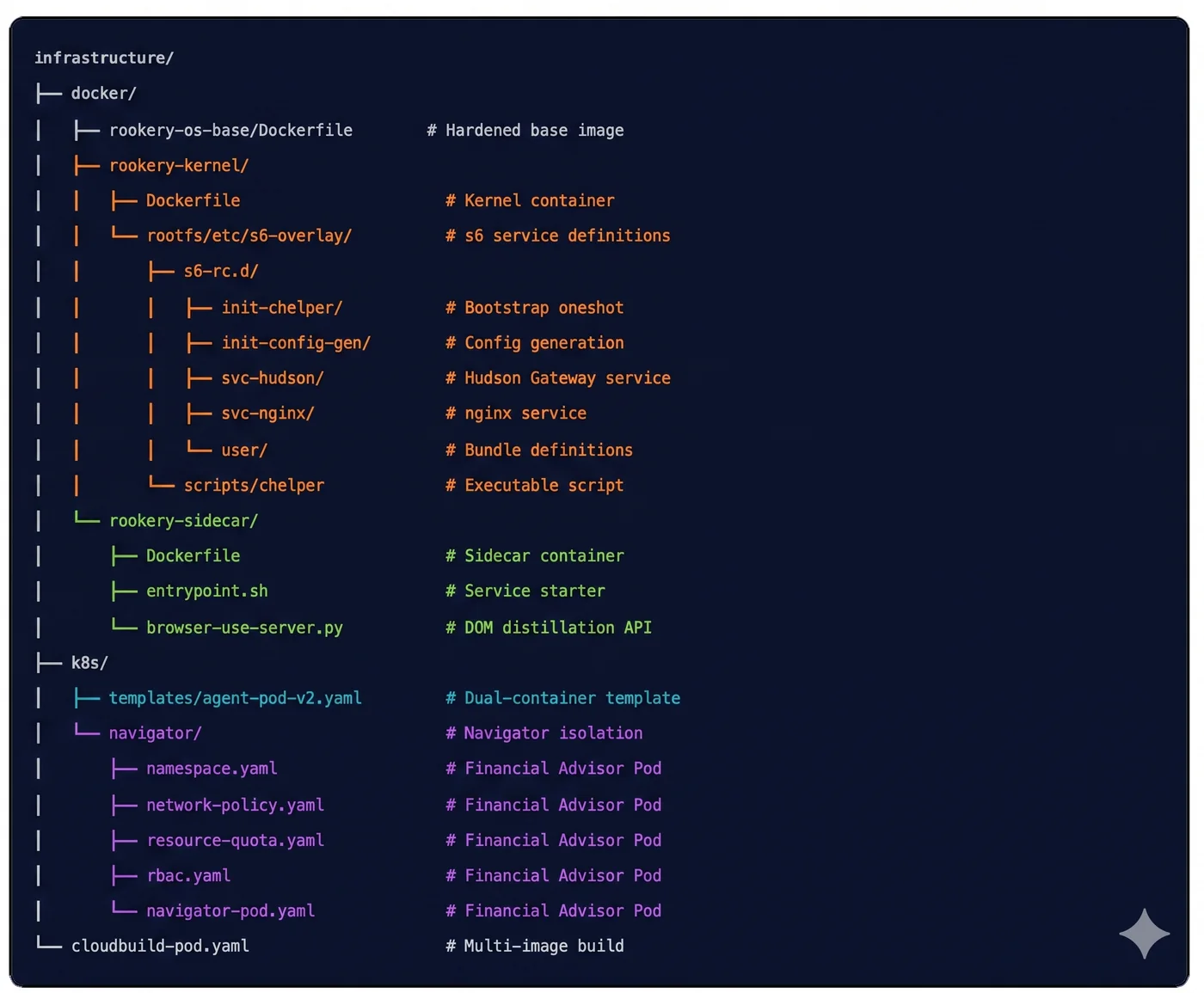
File Locations